If you’ve just had a website built, or you’ve had one for a while and you’re starting to see emails about “plugin updates” and “software versions”, you’ve probably wondered what it all means, and whether you really need to pay someone to deal with it.
Short answer: yes, something needs to happen. The question is who’s doing it. Here’s what each of our plans covers, and how to work out which one fits your circumstances best.
First, what are WordPress core, theme and plugin updates?
Your WordPress website is built from three main pieces of software:
WordPress core is the engine. It’s the underlying platform your whole site runs on. The team behind WordPress releases updates regularly, usually to patch security holes, fix bugs, or improve performance.
Your theme controls how your website looks. Fonts, layout, colours and spacing that’s all the theme. Themes get updated by their developers to stay compatible with new versions of WordPress and to fix any issues.
Plugins are the add-ons that give your site extra functionality. Website builders (such as Elementor, Divi or similar), forms, SEO tools, image galleries, security scanners and more are all plugins. Most websites run at least 5-10 plugins, sometimes more, depending on the level of functionality for the website. Each one needs to stay updated.
When any of these three falls behind, you get problems. Pages can break and display incorrectly. There can be conflicts between plugins and software and when things really go wrong, sometimes ackers find their way in through known vulnerabilities. Google also notices when your site is slow or broken and can quietly drop your search rankings.
It’s for this reason it’s important to understand that updates aren’t optional. They’re how you stop your website from falling apart.

Why can’t I just do this myself?
You absolutely can complete all the updates yourself. Here’s what doing it yourself actually looks like:
- Logging in regularly to check for updates (you can set up auto updates, however, sometimes plugins can conflict with each other, or cause things to break if they are new).
- Backing up your site before you update anything (because updates sometimes break things).
- Running the updates one at a time and checking nothing’s broken after each one.
- Knowing what to do when something does break.
- Monitoring for security threats and dodgy login attempts.
- Make sure your backups are actually working and stored somewhere safe.
It’s not difficult to do, it’s just time-consuming, repetitive, and the cost of getting it wrong can be high. Some business owners are happy to take it on. Most are better off paying someone to handle it so they can get on with running the business.
That’s why we offer four different plans – from “just give me a place to live on the internet” (website hosting only) through to “handle everything for me.”

What do each of the website maintenance and care plans provide?
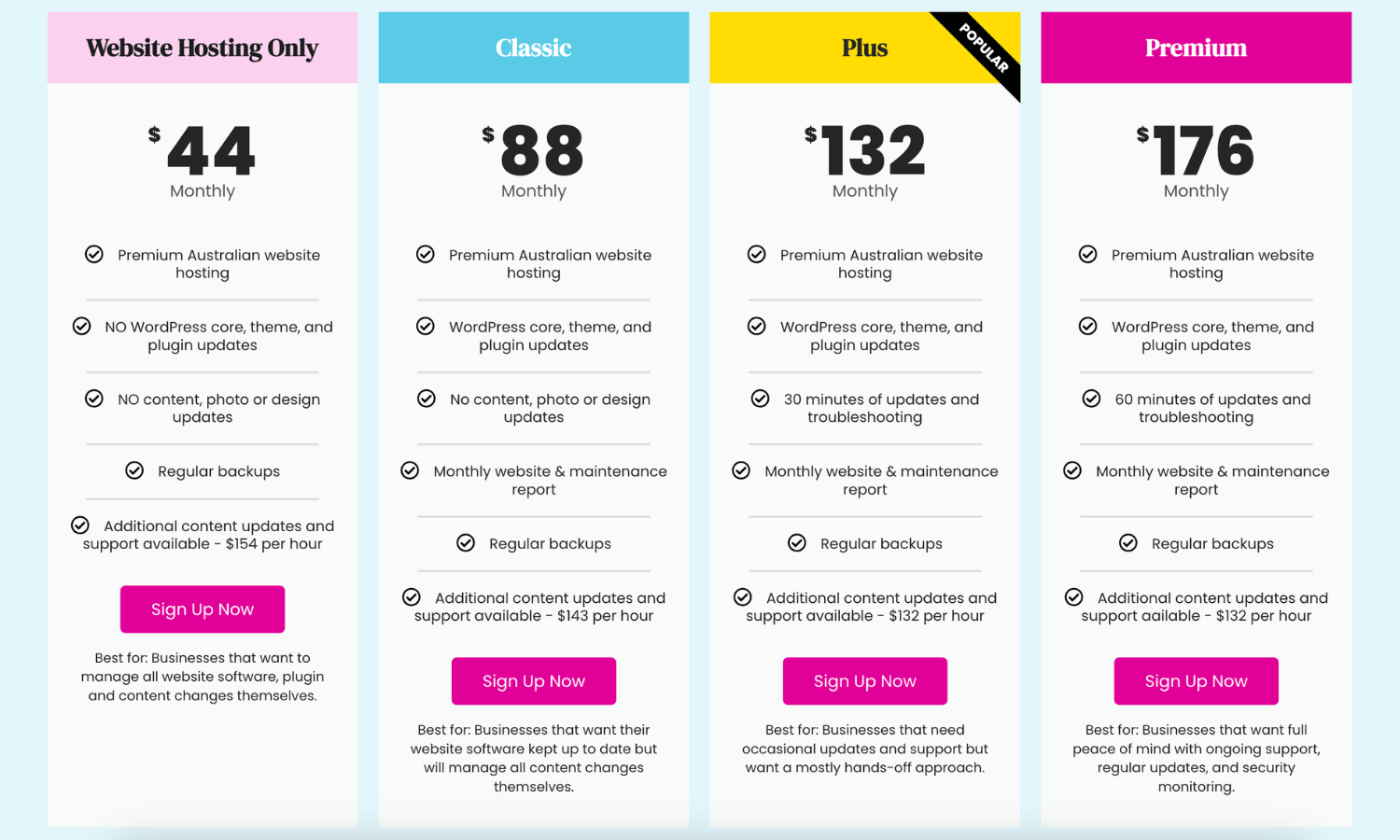
Hosting Only — $44/month
This is the bare-bones option. We host your WordPress website on our premium Australian hosting and run regular backups. That’s it.
No WordPress core updates. No theme or plugin updates. No content changes. All of that is on you.
Best for: Confident WordPress users who genuinely want to manage their own site. You know how to run updates safely, you’re comfortable troubleshooting when something breaks, and you just want reliable, fast hosting without the rest.
A heads-up: if your site does run into trouble down the track because updates haven’t been kept on top of, fixing it is billed at our standard hourly rate. Hosting Only is the cheapest plan upfront, but it’s only good value if you’re actually going to do the maintenance yourself.
Classic — $88/month
This is where most businesses should probably start. Every month, we:
- Host your website on our premium Australian WordPress hosting
- Update WordPress core, your theme, and your plugins
- Run regular backups
- Send you a monthly maintenance report so you can see what’s been done
What it doesn’t include: any content changes. If you want to swap a photo, update your About page, change pricing, or add a new service, that’s quoted separately.
Best for: Businesses with a website that doesn’t change much. You’re happy with the content, you don’t need to update things often, and you just want the technical side handled so the site stays secure and online.
Plus — $132/month
Everything in Classic, plus 30 minutes of updates and troubleshooting each month.
That 30 minutes is your time to use however you like. Swap out a team photo. Add a new testimonial. Update a price. Fix a typo a customer pointed out. Add a new blog post. If something breaks, we look into it. If you’re not sure why something’s behaving oddly, we troubleshoot it.
Best for: Businesses that have a few small changes each month and don’t want to think about it. You want to send a quick email saying “can you swap this out?” and have it done without being quoted every single time.
Platinum — $176/month
Everything in Classic, plus 60 minutes of updates and troubleshooting each month.
Same idea as Plus, just double the time. This is the plan for businesses that update their site regularly – new products or services, ongoing content, seasonal changes, blog posts, event listings, special offers.
Best for: Businesses where the website is actively part of how you run things. You want a marketing partner on call, not a contractor you have to brief every time.
A note on the hours
The included time on Plus and Platinum doesn’t roll over month to month. If you don’t use it in November, it’s not waiting for you in December. That’s deliberate – the plans are designed to keep your site cared for consistently, not to bank time for big projects.
If you’ve got a bigger project coming up (a new page, a redesign, a new feature), we’ll quote it separately so you know exactly what it’ll cost.
Which website hosting and maintenance plan should you pick?
A quick way to decide:
- You’ll handle all the updates yourself → Hosting Only
- You barely touch your website → Classic
- You’ve got a few small changes most months → Plus
- Your website is always evolving → Platinum
If you’re not sure between Classic and Plus, start with Classic. It’s a great starting place for businesses who want the peace of mind, but aren’t sure if they will make many updates. If you know you will want to update content relatively often, then starting on Plus is worth it and means it’s one less thing on your plate.
If you’re considering Hosting Only, be honest with yourself about whether you’ll actually keep up with the updates. If the answer is “probably not, but I’ll get to it,” Classic is the better choice. It’s not much more, and it saves you the bigger fix-it bill later.
Why choosing a maintenance plan is like insurance for your website
Websites that aren’t maintained get slower, less secure and harder to fix the longer they’re left. We’ve taken on plenty of clients whose sites hadn’t been updated in years, and the work to bring them back to a healthy state can be more expensive than what a care plan would have cost over the same period.
A care plan isn’t a tax. It’s the cheapest version of looking after something you already paid to build.
Ready to choose a plan? View our plans and sign up here.